


AI Garden & Home: Nano Home
4.617.00 Reviews
App Specs
- Version
- 1.3.11
- Updated On
- License
- Free
- Downloads
- 100,000+
- Developer
- Hangzhou Suoyi Network Technology Co., Ltd.
- Categories
- House & Home
- Platform
- Android
Screenshots


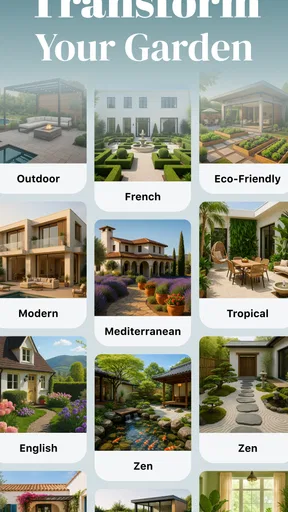
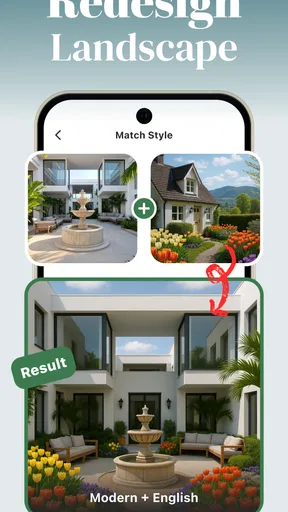
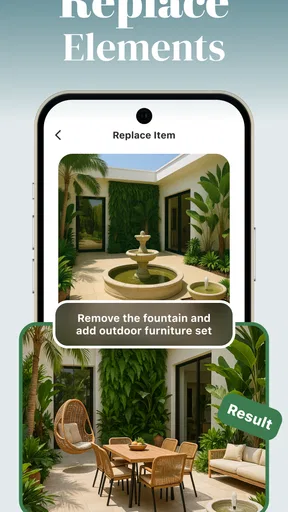
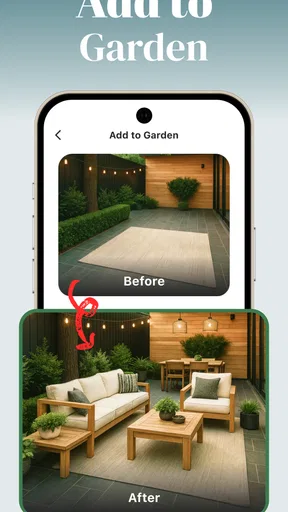
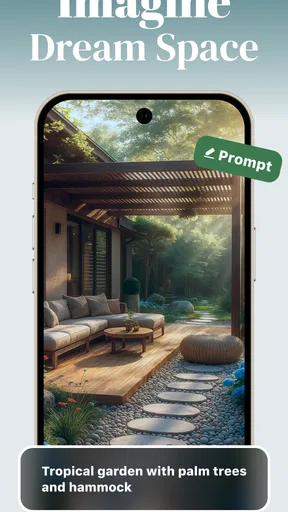
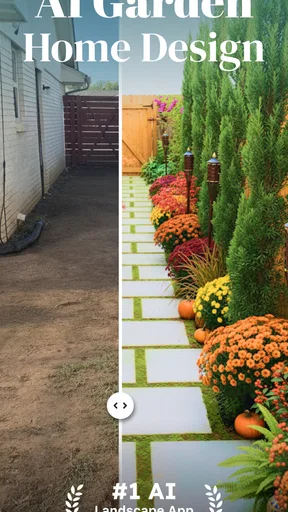
 Analysis by AppCompare
When I try a garden-planning app, I want to know two things quickly: whether it helps me make a useful decision, and what to do when the first attempt doesn’t go smoothly. AI Garden & Home: Nano Home is aimed at people planning changes to a home or garden with AI assistance. That makes it appealing if you have an idea but struggle to picture it, though the experience is most useful when you treat its suggestions as a starting point rather than a finished plan.
Where the first attempts can get stuck
The tricky part of an AI design tool is often not coming up with an idea; it’s giving the tool a clear enough starting point. A photo that cuts off the area you want to change, a cluttered view, or a vague request can make the result less helpful. I’d begin with one visible space and one specific goal, such as exploring a different garden layout, rather than asking for a complete transformation all at once.
There is also a difference between an appealing image and a workable plan. A visualization can help you compare moods and arrangements, but it should not be treated as a guarantee that every plant suits your local conditions or that a design will fit the real dimensions of your space. I use AI concepts to narrow down options, then check practical details before spending money or moving anything.
Small setup checks that save time
If the first result misses the mark, I would check the basics before assuming the app is broken: use a clear view of the area, avoid hiding the important parts behind objects, and describe the change in plain, concrete terms. It can also help to decide what must stay—such as a path, seating area, or existing plant—before asking for a new look. That gives you a better way to judge whether the output is useful.
Think of setup as setting a brief, not filling in paperwork for its own sake. A renter who wants ideas for a balcony has different priorities from someone planning a garden they own. Being clear about the available space and the kind of change you’re considering can keep the suggestions closer to your real needs. I’d also save or note a promising result before experimenting further, so a later variation doesn’t become the only version you can find.
How I would recover a workflow
When a design comes back too busy or far from what I had in mind, I wouldn’t keep making broad changes at random. I’d simplify the request, adjust one element at a time, and compare the new result with the original view. This makes it easier to tell whether the change improved the layout or merely introduced a different style.
For a real project, I’d use the app in stages: collect a few ideas, choose the one that suits the space, and then verify the practical choices separately. That is a more reliable workflow than treating one generated image as a shopping list. It also helps avoid a common trap with visual tools: getting attached to a polished concept before checking whether it makes sense for everyday use.
Worth Reading Before You Choose

Flipboard Shows What News Apps Must Do Beyond the Feed

Switching to Android Auto Means Rethinking Your Driving Routine

Google Calendar Makes a Crowded Week Easier to Manage

Ludo King Makes the Most of the Minutes Between Plans

Baby Panda World Brings Quick Play to Modern Phones, but Its Game Library Feels Busy

ESPN’s Live Game View Makes Following Close Games Easier
Getting Started with AI Garden & Home
First things first, downloading the app was a breeze, available on both Android and iOS. I was greeted by a sleek, minimalistic interface that didn’t scream "tech overload." It was inviting, which is exactly what you want when you’re venturing into new territory.
Once you get past the initial setup, the app prompts you to answer a few questions about your gardening experience, space, and climate. It’s like having a personal gardener asking, "Hey, what’s your vibe?" It then generates a tailored plan to suit your needs. I was impressed by how quickly AI Garden & Home understood my lack of green thumb and recommended some hardy plants that are tough to kill—score!
Features that Make You Go "Wow!"
This app is loaded with features that are both fun and functional. It includes an AI-driven plant identification tool that lets you snap a picture of any plant, and voilà, the app tells you exactly what it is and how to care for it. This is perfect for those spontaneous plant purchases where you later wonder, "What was I thinking?"
Another standout feature is the augmented reality (AR) garden planner. You can visualize how different plants would look in your space before you start digging. I spent way too much time playing with this feature, rearranging my virtual garden like a kid with a new set of Legos.
The app also offers a daily tips section, which is like having a little gardening guru in your pocket. These tips are practical and seasonal, ensuring that your garden is always thriving.
When the device or conditions may be the issue
Not every disappointing result points to a problem with the design tool. A photo can be hard to interpret if the area is poorly lit, viewed at an awkward angle, or partly obscured. If an image-based task behaves unexpectedly, I’d try again with a sharper, more evenly lit picture and a simple description. For outdoor ideas, remember that a visual suggestion cannot account for every detail of your site just by looking at one image.
My practical check is to separate the question “Does this look right?” from “Will this work here?” The first is where a visualization can be useful; the second may depend on conditions that need a person’s own observation or another reliable source. For plant choices, I’d double-check anything consequential—especially if the plant’s identity or care needs are uncertain—rather than relying on a single automated answer.
Who gets the most from it—and who may prefer another route
I can see this being most useful for a beginner who has a small, specific project and wants help getting past the blank-page stage: refreshing a patch by the front door, thinking through a balcony arrangement, or comparing a few looks before asking a garden center for advice. It can also help a homeowner communicate a visual direction to someone else. The value is less about replacing expertise and more about making the early conversation concrete.
If you already know your plants, have measured plans, or need precise construction guidance, a dedicated landscape-design tool or a professional may be a better fit. A notebook sketch and a measuring tape can answer questions an attractive AI image cannot. Likewise, if you only want reliable plant-care facts, a trusted horticultural reference may be more direct than a broader design app.
Compared with searching for inspiration online, the advantage here is the possibility of relating ideas to your own space instead of scrolling through gardens that look nothing like it. The trade-off is that a generated concept can feel more tailored than it truly is. I’d use general image searches for broad style discovery, this app for exploring a personal direction, and measurements or expert advice for decisions that affect cost, safety, or long-term planting.
A realistic way to use it during a busy week
Imagine noticing on Saturday that the corner by your entrance feels bare, but not wanting to buy plants on impulse. I’d take a clear photo, use the app to explore a few possible arrangements, and save the one that seems closest to the space and the look I want. Then I’d check the site’s light and available room, confirm that any suggested plants suit local conditions, and only then make a purchase. That small sequence turns inspiration into a decision without pretending the app has done the real-world checks for me.
There’s another useful habit: keep the first request modest. Ask for ideas for the bare corner rather than redesigning the whole yard. Once you know what direction works, expand the plan. This makes the results easier to compare and reduces the chance that a dramatic all-at-once concept distracts from the one change you actually wanted to make.
Keeping It Real
While the app is fantastic, it’s not without a few quirks. The initial setup can feel a bit like an interrogation, but it’s worth it for the personalized plan. Also, some of the advanced features require a subscription, which might be a bummer if you’re on a tight budget. But honestly, the free version offers plenty to get you started on your gardening journey.
Also, while the plant identification tool is generally accurate, it can sometimes get tripped up by rare or hybrid plants. It’s always a good idea to double-check with a quick web search if you’re unsure.
AI Garden & Home is a free House & Home app from Hangzhou Suoyi Network Technology Co., Ltd. Its average rating is 4.6 from around 2.4 thousand ratings, and it has over 50 thousand installs. It is rated for everyone and is currently at version 1.3.11; in-app purchases range from $5.99 to $59.99 per item. I’d try the free experience first and decide whether any paid option is worth it for the way you actually use the app, rather than paying simply because a feature sounds impressive.
One trade-off I’d keep in mind is that personalization depends on the information and images you provide. If your space changes seasonally, or you are planning for a different part of the yard, revisit the brief instead of expecting an earlier idea to apply everywhere. That extra step may feel slower, but it is better than carrying a design assumption from one spot into another with different light, size, or purpose.
Wrapping Up My Green Adventure
After a few weeks of using AI Garden & Home: Nano Home, I can confidently say my garden looks better than ever. This app took me from "plant killer" to "plant nurturer" in no time. It’s perfect for anyone who wants to dip their toes into gardening without diving headfirst into the deep end.
Whether you’re a seasoned gardener looking for a tech upgrade or a newbie like me just trying to keep a few plants alive, this app is a fantastic tool. So, if you’re ready to transform your space into a green oasis, give it a shot. Happy gardening!
My practical verdict
I’d recommend giving it a try if you want approachable visual ideas and can treat them as drafts to evaluate, not instructions to follow blindly. Its strongest role is helping you decide what you might like before you commit time, money, or plants. The questions about space and climate help make the experience feel more personal, while image-based identification and garden visualization offer useful ways to explore.
I’d skip it if you need exact planting plans, dependable identification for an unusual specimen, or professional-level measurements and specifications. For everyone else, the sensible approach is to start with one small area, check the results against the conditions you can see for yourself, and keep the final decision grounded in the real garden. That balance is what makes the app worth exploring without expecting it to do a gardener’s job for you.
Pros
- User-friendly interface for easy navigation.
- Variety of AI-driven gardening tips.
- Customizable alerts for plant care.
- Integration with smart home devices.
- Offline mode available for remote areas.
Cons
- Limited plant database for rare species.
- Occasional app crashes reported.
- Requires premium for advanced features.
- High battery consumption during use.
- In-app ads can be intrusive.
FAQs for AI Garden & Home: Nano Home
What is AI Garden & Home: Nano Home and how does it work?
AI Garden & Home: Nano Home is an innovative app designed to help users manage their gardens and home spaces efficiently. It utilizes advanced AI technology to provide personalized gardening tips, design suggestions, and maintenance reminders. The app analyzes your space and offers tailored solutions to enhance your garden and home environment.
Is AI Garden & Home: Nano Home suitable for beginners in gardening?
Absolutely! AI Garden & Home: Nano Home is designed with both beginners and experienced gardeners in mind. The app provides step-by-step guidance and educational resources, making it easy for anyone to start and maintain a beautiful garden. Its user-friendly interface ensures a smooth learning curve for novices.
What features does AI Garden & Home: Nano Home offer?
AI Garden & Home: Nano Home offers a range of features including plant identification, weather forecasts, watering schedules, and pest management tips. Additionally, it provides home design ideas and integration with smart home devices. These features are designed to simplify garden and home management, making it a comprehensive tool for users.
Does AI Garden & Home: Nano Home require an internet connection?
While AI Garden & Home: Nano Home can function with limited offline capabilities, an internet connection is recommended for optimal performance. Features such as real-time weather updates, plant database access, and AI-driven recommendations require connectivity to provide the most accurate and up-to-date information.
Are there any subscription fees for AI Garden & Home: Nano Home?
AI Garden & Home: Nano Home offers both free and premium subscription plans. The free version includes basic features, while the premium plan provides access to advanced tools, personalized consultations, and exclusive content. Users can choose the plan that best suits their needs, with the option to upgrade at any time.


